Fit Futures · with C.E.A Smith · 24 November 2026

Fit Futures, start to finish

Everything we have built, where each part stands, and what we need from you to finish it.

The aim for today: by the end of this call we know what goes live first, when, and who is doing what. Then we can finish it.

Where we are

Built and ready to show, waiting on a few pieces from you

Built

The new Fit Futures system

Leads, the advisor desk, enrolment and payment plans, courses, marking, booking, progress and reports. Running today on demo data, with your team each holding their own link to try it.

Built

The new website

Ready as a preview. fitfutures.co.nz keeps showing the current site until you say go live.

Done

fitfutures.co.nz

Moved across to us on 18 November. Fit Futures is still the owner, and the website and email kept running the whole time.

Done

Email settings

DMARC added, the website's email records put back on 20 November, and the Google signing key is in place.

Connected

Facebook page and pixel

Both connected to our Business Manager.

Waiting

Ad account

Not shared with us yet. The steps are below, and it takes two minutes on the call.

Start to finish

One learner's path through the new system

Each clip is a real screen recording of the system, about 15 seconds, no sound. Everyone in it is invented demo data.

Step 1

Someone finds you and enquires

The new website leads with what people ask first: how long it takes and how it fits around work. Every qualification has its own page, and every enquiry form feeds straight into the system.

  • Offers kept in one place, so monthly changes are one edit
  • Prices shown including GST, as you asked
The new website (preview).
Step 2

The enquiry lands on an advisor's desk

One record per person: where they came from, what they wrote, every call and message. Overdue calls show in red so nobody slips through.

  • Ring from the card, log the call, book the next step
  • Saved texts and emails, and bulk email to a list

Part of stage one: an assistant rings each new enquiry within minutes in your call hours and books them in with an advisor.

An advisor opens a lead and works it.
Step 3

They enrol and pick a payment plan

The advisor turns the lead into an enrolment in one tap. The course, the plan and the schedule are set from your offers, the agreement is signed in writing, and every payment is tracked.

  • Pay in full, deposit then weekly, or monthly
  • Current Debit Success students stay where they are
An enrolment with its payment schedule (demo figures).
Step 4

They learn, on their phone

The learner opens the app and sees one thing: what to do next. Units, practical hours toward the 40, and their progress, all in one place.

A learner's Today screen and course.
Step 5

A tutor marks, with an AI draft to start from

Submissions queue oldest first. The AI reads the answer against your rubric and drafts a suggestion and feedback. A tutor checks it and signs every result. The AI never decides.

  • Tia confirmed this is how it should work
The marking queue and one submission with its AI draft.
Step 6

Practical sessions get booked

Learners ask for times, tutors set when they are free, and the gaps show up straight away: the red boxes are times learners want with nothing open.
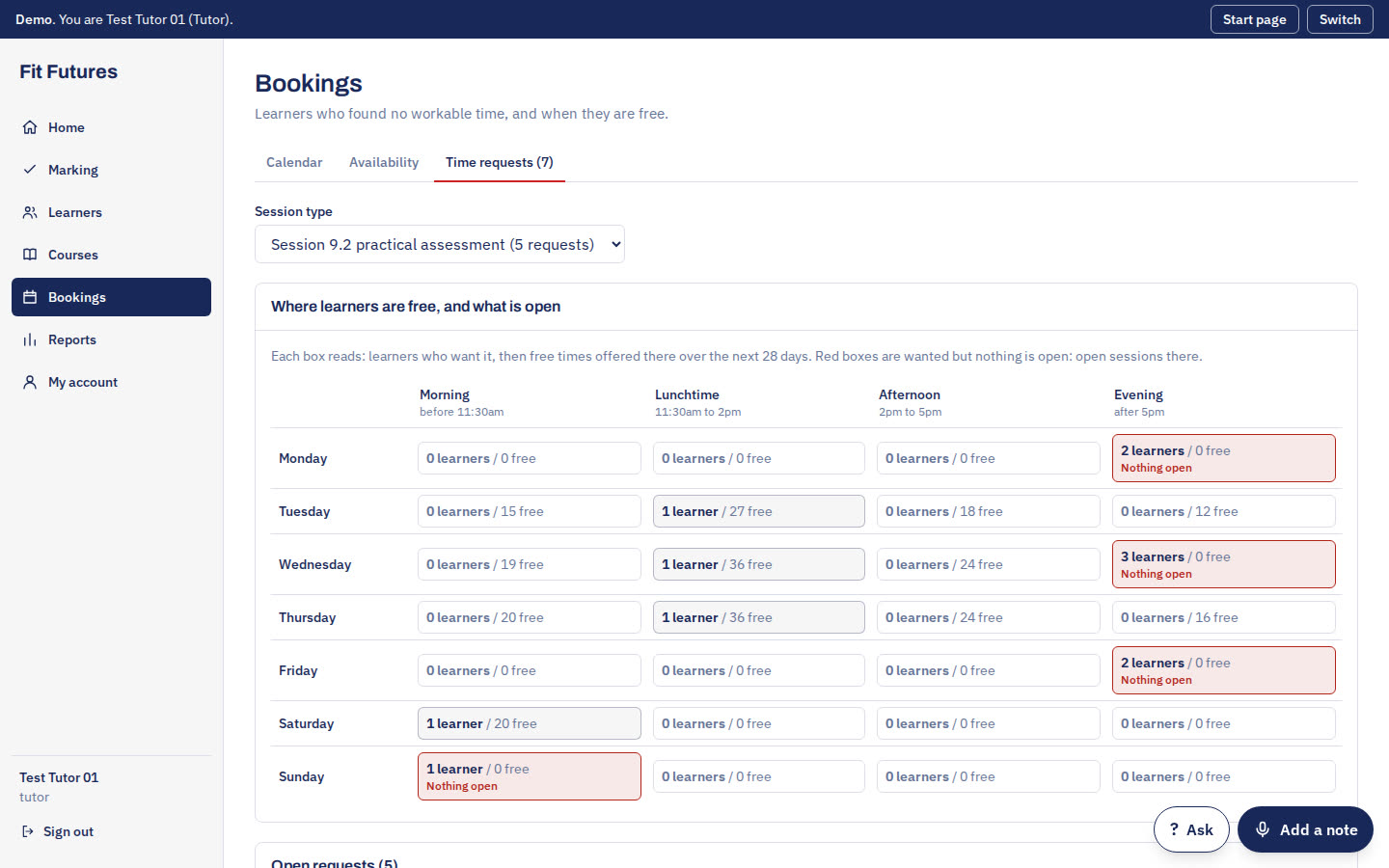
Booking requests grid showing times learners want against open times Time requests for a practical assessment.
Step 7

You see how it is all going

Leads in, how many were spoken to, booked and enrolled, and each advisor's pace against the team's target.

The sales report (demo figures).
What you asked for

Your team's notes, and what happened to them

Built

Korey: bulk email from templates

Email one lead or a whole list from saved templates. Anyone who opted out is left off automatically.

Built

Diana: saved texts and targets

Saved texts, plus team and personal targets with each advisor's pace in the reports.

To confirm today

Diana: the roster

So a booked follow-up shows who is working. We need the column headings from the roster sheet.

To confirm today

Tia: three ideas

Seeing when a learner drops off in real time, syncing bookings to Google Calendar for the Module 8.4 consult call, and taking appeals out of marking. Which of these matter for stage one?

What goes live first

Stage one: from enquiry to paid enrolment

Our suggestion. Stage one is the part that brings money in: a website enquiry becomes one record, gets a call within minutes, lands with an advisor, and ends as a signed, paid enrolment, with nobody typing anything twice.

Stage one

The money path

Website and enquiry forms, the advisor desk, the call assistant, enrolment, payment plans and failed payment reminders, and the sales report.

Stage two

Learning and marking

Your courses, the learner app, marking with AI drafts, and bookings move across once stage one is running.

How we know it works

A real test enrolment

Before go-live, Korey enrols himself on his own phone, pays, and gets a receipt and a signed agreement.

What we need from you

Seven things, then we can finish

Let's put a name and a day against each one on the call.

Jase

Share the Fit Futures ad account

So we can run the ads with tracking that sees enrolments.

Meta Business Settings, then Accounts, then Ad accounts. Pick the Fit Futures account, choose Assign partners, enter Business ID 4365015677076663 and give full control.
Korey

Click "Start authentication" in Google

The Google key is now in place. This click in Google Admin switches it on, and it is the last step against the Hotmail and Outlook bounces.

Who?

Stripe access

Add info@ceasmith.com to your Stripe account, so we can set up the payment plans and the enrolment page.

Who?

Your current leads from Gym Leads

An export, or a user for info@ceasmith.com, so your current leads come across on the day we switch.

Who?

Course content and rubrics

Your course material and the written marking guides, as files. These are what the learner app and the AI drafts are built from.

Diana

Roster column headings

Just the headings from the roster spreadsheet.

Who?

Logo, photos and REPs wording

The original logo file, an OK from the people in your photos, and the exact REPs wording you want on the website.

Decisions today

Four calls only you can make

  1. The go-live date

    We suggest stage one live before the mid-January campus intake, so those enquiries run through the new system.

  2. How enrolments are signed

    Written e-signature only, or keep the voice-recorded option as well?

  3. Who gets hot leads first

    And do Korey and Jase want their own advisor desk logins?

  4. A Fit Futures number for calls and texts

    The call assistant and the text messages go out from a number of Fit Futures' own. Are you happy for us to set one up?

Next steps

From today to go-live

TodayWe send one short written summary: the stage one list, the date, and each person's item.
This weekThe seven items above come through: ad account, Google, Stripe, Gym Leads, course files, roster, logo.
As each one landsWe build it in: ads with tracking, the call assistant on test enquiries, advisor logins, payment plans and the enrolment agreement, the reports.
Before go-liveYour advisors check the call script. Korey does one real test enrolment on his phone.
Go-liveCurrent leads move across, and the new website goes onto fitfutures.co.nz when Korey says go.

By the end of this call

We will know what goes live first, the date we are aiming for, and who is sending each of the seven things. That is everything we need to finish stage one.